
Remove the Lock so there is nothing but noise
Eminent Seizure
You are at a border crossing. The officer points at your laptop bag and your phone. “Unlock them.“
Your heart rate spikes. Not because you have something to hide. Because you have something to protect.
They will take your devices into a back room. They will clone every byte. They will run forensic tools that strip away your privacy layer by layer. And if they find anything suspicious, they will dig deeper. Much deeper.
But you understand and are prepared, you practice Guerrilla Privacy.
This is a “cold seizure”. Your devices are powered off or locked. You have no time to react. You either comply or you don’t. There is no middle ground.
Most privacy guides tell you to install VeraCrypt. Bad advice. If a someone finds VeraCrypt on your machine, you might as well have written “ask me about my hidden volume” in Sharpie on the lid. It is a red flag that guarantees a deeper search.
We are not installing anything. We are using what is already there.
Your Linux laptop ships with LUKS encryption by default. Your Pixel phone running GrapheneOS has hardened encryption built in. Neither is suspicious. Both are expected. We are living off the land.
The trick is not adding more locks. The trick is removing the keys. This is the Shell Game – One for deception and one with no way for them to get into or see.
We are going to build a system where your real data exists on your devices as encrypted noise. No header. No keys. Nothing for forensic tools to identify. Nothing for you to confess to. This is the ‘Shell Game’.
And the only thing that brings it back to life is a MicroSD card in your pocket.
This is border crossing with Guerrilla Privacy.
The Prep Phase: Why This Works
Encryption has two parts: the data on the disk, and the key that makes it readable. Most people focus on protecting the key. We are going to destroy it.
A LUKS partition has a header. Think of it as the map that tells the system how to decrypt your data. Without that header, the partition is just a block of random bytes. No forensic tool can identify it as encrypted data. It looks like corrupted space or a wiped drive. The data is still there, but it is mathematically unreachable.
GrapheneOS works the same way. When a user profile is active, the encryption keys sit in RAM so the phone can access data instantly. When you end that session, the keys are purged. The data remains on disk, fully encrypted, with no key available to decrypt it. The phone cannot read it. A clone cannot read it. Nobody can read it until you enter the password again and re-derive the keys.
This is not hiding data. This is making data invisible to the tools that search for it.
The Prep Phase: How To Set It Up
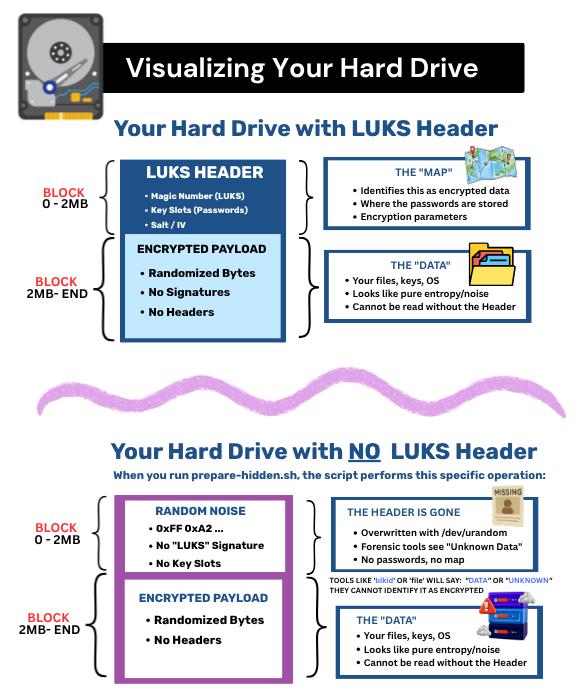
On Your Laptop
Install Linux with LUKS full disk encryption enabled. This is the default on Pop!_OS, Ubuntu, Debian, Fedora, and most others. Nothing suspicious here.
Create a second LUKS partition in the free space on your drive. This is where your real data will live. Set a strong password. Move your sensitive files into it. Make sure it works.
Now back up the header of that second partition to your MicroSD card. This is roughly two megabytes. Small enough to fit on any card alongside your phone recovery data.
Once the header is backed up, wipe it from the partition on your drive. The partition table still shows the space exists, but the first few megabytes are now random noise. No signature. No LUKS marker. Nothing.
Test it. Reboot. Try to access the hidden partition without restoring the header first. It should fail. Then restore the header from the MicroSD card and confirm you can access your data again. Practice this until it is muscle memory.
On Your Phone
Install GrapheneOS on your Pixel. Set up your Owner profile as the boring decoy. Mundane apps, harmless browsing history, nothing sensitive.
Create a secondary user profile. This is where your real life lives. Your encrypted chat, your real accounts, your actual data.
Enable the “End Session” option on that secondary profile. When you tap it, the encryption keys are purged from memory. The profile becomes a locked vault with no key.
Test it. End the session. Try to access the profile. It should demand your password again. The data is safe, but unreachable without it.
On Your MicroSD Card
Store the LUKS header backup and your GrapheneOS recovery seed on the same card. This card is now the only thing that can bring your digital life back from the dead.
Protect it. Hide it. Memorize where it is. This card is your escape hatch.
The Laptop: What You Are Actually Doing
When you install Linux with LUKS, the installer typically uses your entire disk. There is no room left for a second partition. So we need to shrink what is there and carve out space.
This is not dangerous if you do it right, but it does require care. Back up your data first. Always.
Shrinking the Existing Partition
Your main LUKS partition takes up the whole disk. We need to make it smaller. Boot from a live USB so the disk is not in use. Open a partition tool like G-Parted or KDE Partition Manager. Select your LUKS partition and shrink it by however much space you need for your hidden data. Fifty gigabytes is plenty for most people. The rest becomes unallocated space.
Creating the Hidden Partition
In that un-allocated space, create a new partition. Format it as LUKS. Set a strong password. This becomes your hidden volume. Move your sensitive files into it. Confirm it works.
Backing Up the Header
The LUKS header is a small file, about two megabytes. It sits at the very beginning of the partition and tells the system how to decrypt your data. We are going to copy it to your MicroSD card and then destroy the original on the disk. The command for this is in the README. It is one line. You point it at the partition and tell it where to save the file.
Wiping the Header
Now we overwrite those first few megabytes of the hidden partition with random data. The partition still exists in the partition table, but the encryption metadata is gone. Forensic tools cannot identify it as LUKS. It looks like garbage. Again, one command. It is in the README.
Restoring the Header
When you are safe, you reverse the process. Copy the header from the MicroSD card back to the partition. The LUKS signature returns. You enter your password. Your data reappears. One command.
The Phone: What You Are Actually Doing
This device is simpler. GrapheneOS handles the heavy lifting for you.
Setting Up Profiles
In GrapheneOS, go to Settings, then System, then Multiple Users. Create a new user profile. Switch to it and install your real apps. Switch back to Owner and make that profile look boring.
Ending the Session
When you are in the secondary profile, tap the power button. You will see an option called End Session. Tap it. The encryption keys are purged from memory. The profile is still there, but it is locked and key-less.
That is it. No commands. No scripts. GrapheneOS does the work.
The MicroSD Card: What Goes On It
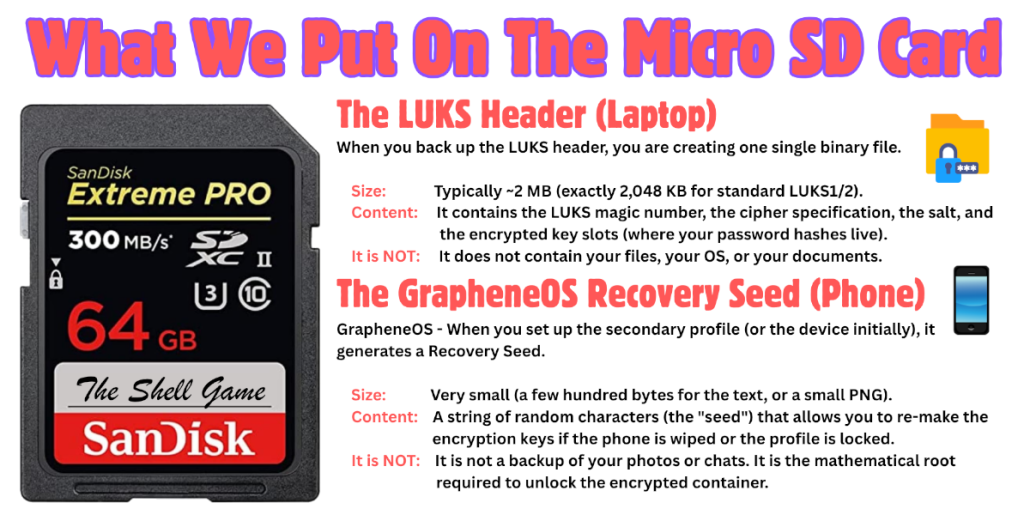
Format the card as a standard FAT32 drive. Create two folders. One for the LUKS header backup file. One for the GrapheneOS recovery seed, which you can save as a text file or a QR code image.
This card is your lifeline. Guard it accordingly.
The Helper Scripts: Verification Over Trust
We are not asking you to trust us. We are asking you to verify.
The scripts are provided as a signed ZIP file attached to this article. Inside, you will find the source code, a README.md that explains every line, and a GPG signature file.
How to Use Them Safely:
Download: Grab the ZIP file directly from this post.
Verify: Check the SHA256 hash against the one listed below. Then, verify the GPG signature using our public key. If the signature fails, do not run the scripts.
Audit: Open the README.md and the script files. Read them. Understand what they do. They are simple bash scripts; they do not contain hidden payloads or back doors.
Self-Host: Once verified, move the code to your own Gitea instance. Fork it. Modify it to fit your specific hardware. Share it only within your trusted circle.
What the Scripts Do:
‘prepare-hidden.sh’: Handles the dangerous partitioning and header wiping on your laptop. It prompts you for confirmation at every step so you never accidentally overwrite your main system.
‘restore-hidden.sh’: Restores the LUKS header from your MicroSD card and unlocks your hidden partition.
‘graphene-check.sh’: A simple status checker for your phone to ensure your secondary profile is in the “Ended” state before you travel.
These tools exist to remove the risk of human error. They turn complex forensic commands into a guided, safe procedure. But the responsibility remains yours. Verify the code. Run it on your own terms. Own your own security.
The Closing: Muscle Memory and Separation
This defense only works if it is instinct. Do not wait until you are at the border to figure out which button to press or which script to run.
Practice the full cycle today. Wipe the header. End the session. Reboot. Then restore the header and log back in. Do it until your hands know the motions before your brain catches up.
Remember the golden rule: Separation.
Your devices are the lock. Your MicroSD card is the key. Never carry them together. If they seize your laptop and your phone, they have the lock. If they find the card, they have the key. But if you keep them apart, the data remains mathematically dead.
Hand over the devices. Keep the card. Walk away.
When you are safe, plug in the card, restore the header, and your life reappears. The noise becomes data again. The lock opens.
This is not about hiding. It is about making your data invisible to the tools that hunt for it. It is about turning your own devices into a shell game that only you can win.
Now go practice.

Disclaimer:
This article is for individuals at higher risk or in places that have repressive governments. It is intended to augment freedoms that we all hold dear. I do not advocate anything illegal or immoral be done with this knowledge. Be safe out there.