Overall Landscape:
The solution is flooding the reservoir. We are moving beyond simple noise generation to Identity Multiplicity. Instead of trying to erase your name, we create a dozen “yous” simultaneously: a ski instructor in Denver, a chicken farmer in Texas, a canoe guide in Florida. All using your real name. All with verified phone numbers, active email inboxes, and physical mail drops. Making the “profile” they have on you into a lie.
We start with Clean Skins. These are fresh accounts we create from scratch and artificially aged through controlled history generation. The bots handle the heavy lifting of establishing history and maintaining narrative, while you provide the critical ten percent of human intervention. This includes timed phone calls, local forum posts, and “social proof” interactions that validate the illusion.
The result is a data ecosystem where the broker’s algorithm hits a logical wall. It cannot merge the profiles because the data is physically impossible. It cannot discard them because they are verified and consistent within their own narratives. The cost of untangling this web exceeds the value of the data itself.
You are not playing defense. You are turning the surveillance economy’s own tools against it, creating an identity that is everywhere and nowhere at the same time.
Phase 1: Strategic Planning
Before you fire up the script or buy a single phone number, define the scope. This is not about building the biggest army; it is about building the right army for your threat level. The goal is to create enough statistical noise that the signal-to-noise ratio collapses for your adversary, without over-complicating your own life.
Your clone count is determined by who is trying to find you and how much they care.
- Low Threat: Two to three clones. Goal is noise generation and misdirection.
- Medium Threat: Four to six clones. Goal is fragmentation of your profile.
- High Threat: Eight to twelve or more clones. Goal is an impossible life.
- Critical Threat: Twenty plus clones. Goal is total dissolution of your identity.
- Rule: Start low, scale only if necessary. Quality is better than Quantity.
Action Step
Assess your threat level now. Select your clone count. Then provision your infrastructure (phones, emails, vaults) before you configure the script.
Phase 2: The 5 Archetypes
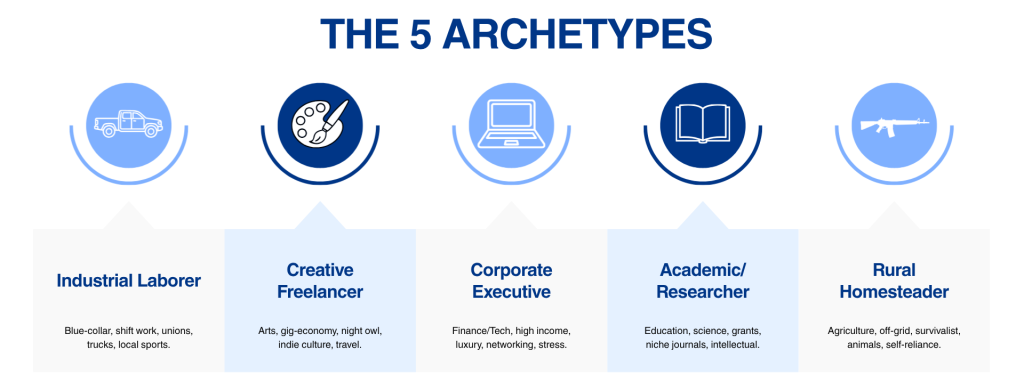
Instead of random jobs, choose from these five semantically distant archetypes to ensure maximum fragmentation. Randomly assigning jobs leads to “semantic overlap,” where a broker sees “Baker,” “Pastry Chef,” and “Bread Maker” and correctly clusters them as a single “Food Service” profile. To truly fragment your identity, your clones must be semantically distant. They need to pull your data profile in radically different directions: different industries, income brackets, daily routines, and interest graphs.
- The Industrial Laborer: Blue-collar, shift work, unions, trucks, local sports.
- The Creative Freelancer: Arts, gig-economy, night owl, indie culture, travel.
- The Corporate Executive: Finance/Tech, high income, luxury, networking, stress.
- The Academic/Researcher: Education, science, grants, niche journals, intellectual.
- The Rural Homesteader: Agriculture, off-grid, survivalist, animals, self-reliance.
How to Determine Your Mix
The goal is Maximum Entropy. You want your data profile to be a chaotic mix of signals that cannot be averaged into a single “real” person.
- Map Your Real Self: Identify which archetype you actually resemble. If you are a cybersecurity expert, you likely fit the Corporate Executive or Academic bucket. This is your “High Risk” zone.
- Select the Opposites: Your first priority is to choose clones that are the furthest possible distance from your real self. If you are an Executive, you must include an Industrial Laborer and a Rural Homesteader. If you are an Academic, you must include a Creative Freelancer and a Laborer. These combinations create the sharpest contradictions. A broker cannot easily merge “CEO” with “Farmhand” without flagging the data as an error.
- Fill the Gaps: Use the remaining archetypes to fill the middle ground. Ensure no two clones share the same industry, income bracket, or geographic vibe.
- Bad Mix: Executive + Academic + Student (All “White Collar/Intellectual”).
- Good Mix: Executive + Laborer + Homesteader + Creative (Spanning the full spectrum of society).
- The Geographic Reality Check: Before finalizing, verify that your chosen city has a VPN exit node and a plausible local economy for that job.
- Valid: “Laborer” in Detroit (Auto industry).
- Invalid: “Lobster Captain” in Idaho (No ocean – obvious fake).
- Valid: “Creative” in Austin (Tech/Music hub).
- Invalid: “Oil Rig Worker” in Vermont (No offshore drilling – obvious fake).
Action Step
Open your configuration file and complete the Archetype Matrix before proceeding.
Phase 3: Infrastructure & Clean Skins
- The Anchor: Your real, physical mail drop (Local drop in your state).
- Clean Skins: Fresh accounts created specifically for this operation, then artificially aged through automated history generation to simulate years of existence.
- Growth Protocol: The script enters the accelerated growth phase, simulating judicious browsing habits — reading threads, viewing profiles, lingering on posts — to build a behavioral history that mirrors a real user organically discovering and engaging with a platform over time.
The Four Pillars:
Before you can scatter your clones across the country, you need a single, verifiable root. This is your Anchor.
The Anchor is your real, physical mail drop (a commercial mail receiving agency, a UPS Store box, or a dedicated forwarding service). This is the one piece of your infrastructure that is 100% real and physically accessible to you.
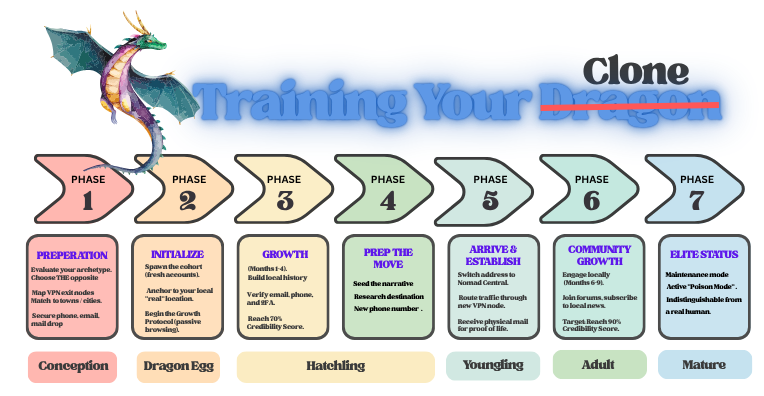
The Growth Protocol
Run the script to initialize Clean Skins. These are fresh accounts. Begin the Growth Protocol. The script simulates months of passive browsing and low-frequency logins to establish a credible history without revealing the account’s true origin.
Action Step:
1. Secure your mail drop. Ensure you have a commercial mail forwarding service that accepts packages and provides a street address.
2. Run the Growth Protocol. Let the script initialize your fresh accounts.
3. Build the Local Histories. Let the bots run their Warm-Up phase in their respective cities without the Anchor address yet.
4. Monitor Credibility. Wait until each clone hits seventy percent credibility.
5. Verify. Order a physical item to the Anchor to generate proof of life.
Phase 4: Geo-Network Alignment
- The Rule: The clone’s City must match the VPN Exit Node.
- The Process:
- Select an Archetype (e.g., “Homesteader”).
- Find a city with a reliable VPN node (e.g., “Boise, ID”).
- Assign the Archetype to that city.
- Ensure the phone number has the correct area code (208).
- Ensure all traffic routes through the Boise node.
- Result: Geographic consistency eliminates “IP mismatch” flags.
You have your personas, your archetypes, and your anchor. Now you must ensure your digital footprint matches your physical narrative.
The most common way data brokers flag a synthetic identity is through IP Mismatch. If a profile claims to be a “Ski Instructor in Denver” but their internet traffic originates from a server in Frankfurt or a residential IP in New York, the algorithm immediately lowers the credibility score. It assumes the user is hiding, using a proxy, or is a bot.
To defeat this, you must enforce Geo-Network Alignment. Every action taken by a clone must originate from a network node that corresponds to its claimed location.
The Alignment Protocol
- Map Your Exit Nodes Before assigning a city to a clone, check your VPN or proxy provider’s list of available exit nodes.
- Requirement: You need a reliable, high-speed exit node in the specific city (or immediate metro area) of your clone.
- Selection: If your “Denver Skier” needs a 303 area code, ensure you have a Denver exit node. If you only have a generic “Colorado” node, verify it resolves to a Denver IP range.
- Backup: Have a secondary provider ready. If the primary Denver node goes down, you need an instant fail-over to another Denver node to avoid a “location jump.”
- The “Local IP” Rule
- Strict Enforcement: The script must route all traffic for a specific clone through its designated city’s exit node.
- No Exceptions: Even checking email, reading news, or posting a comment must happen through the local IP.
- The “Commute” Simulation: If the persona is “working from home,” the IP should be stable. If they are “out and about” (e.g., visiting a coffee shop), the IP can fluctuate slightly within the city’s range, but never jump to a different state.
- The “Area Code” Synergy
- Phone Number: Must match the city’s area code (e.g., 303 for Denver, 512 for Austin).
- IP Address: Must match the city’s region.
- Time Zone: All automated activity (posts, logins, browsing) must occur within the local business hours of that city.
- The Check: If the script detects a time zone mismatch (e.g., posting at 3 AM local time for the persona), it pauses and waits for the correct window.
- Handling Travel (The “Nomad” Exception)
- If a clone is “traveling” (part of the nomad narrative), the IP can change.
- The Narrative: “Heading to the mountains for a weekend trip.”
- The Execution: The script switches the exit node to the destination city for 48 hours, then switches back.
- The Constraint: The Phone Number and Mail Address (the Anchor) remain constant. Only the IP changes. This mimics a real traveler using local Wi-Fi or roaming data.
Action Step
- Audit Your Infrastructure: List your available VPN/proxy exit nodes. Identify which cities you can reliably support.
- Assign Cities: Match your selected Archetypes to these cities. Do not assign a city if you do not have a reliable exit node for it.
- Configure the Script: Input the specific exit node IP/host name for each clone into the configuration file.
- Test the Route: Manually verify that when you connect to the “Denver” node, your IP resolves to Denver, and your browser reports the correct time zone.
- Lock the Routing: Ensure the script cannot accidentally route traffic through a default or “random” node. It must be hard-coded to the specific city node for that clone.
Phase 5: Staggering & Human-in-the-Loop
- The Rollout: Do not launch all at once.
- Clone A moves in Week 1.
- Clone B moves in Week 3.
- Clone C moves in Week 5.
- The Pre-Load: Change phone numbers before the move is announced.
- The Human Touch:
- The Ratio: Clones handle ninety percent of the workload. This includes RSS feeds, background browsing, automated comments, and newsletter signups.
- The Human Touch: You handle ten percent of the workload. These are the High-Value Interventions that validate the persona.
What the Human Does:
- The Real Call: Use your eSIM number to call a local business and ask a specific question. “Do you have rentals for the season?” or “Do you deliver to this address?” This generates a voice log and a customer service record that bots cannot fake.
- The Emotional Post: Write a comment on a local forum in your own words. “Just moved in and the neighbors are already complaining about my dog!” This adds sentiment and context that scripts lack.
- The Social Check-in: Have Clone A comment on Clone B’s post. “Hey! Heard you’re moving to Austin too. Welcome to the state!” This creates a social graph that validates the existence of multiple personas.
3. The Daily Briefing System
Your script acts as a Command Center, generating a daily report for you through the HUD (Heads-Up Display).
Action Step:
- Run the script with the
--interactiveflag to launch the HUD. - Review the “Today’s Mission” screen for pending human tasks.
- Execute the tasks (make a call, post a comment, confirm a delivery).
- Mark them done and close the session.
Phase 6: The Credibility Score
Metric: A calculated score from zero to one hundred percent based on four pillars. Threshold: Do not activate “Poison Mode” until the score hits seventy percent.
The Scoring Formula
The ZimaBoard script computes this score for each clone every twenty-four hours. It weighs four pillars of identity verification.
1. Account History and Age (20%) This measures how long the persona has existed in the data ecosystem. It counts days since account creation, the number of historical posts preserved, and continuity. A brand new account is suspicious. An account with three years of history is trusted.
2. Verification Depth (35%) This measures how many “hard” proofs of existence the persona has.
- Email verified adds ten percent.
- Phone verified via SMS 2FA adds fifteen percent.
- Physical mail received adds ten percent.
- 2FA vault configured adds five percent. This is the heaviest weight. A persona without a verified phone or physical address is easily dismissed as a burner.
3. Engagement Breadth (25%) This measures if the persona is interacting with the world or just watching. It counts the number of unique platforms active, the depth of interaction (comments are better than likes), social proof (replies from other users), and subscription count. Real people consume and create. Bots mostly consume.
4. Narrative Consistency (20%) This measures if the data makes sense together. It checks temporal alignment (activity during local business hours), geographic alignment (IP matching the claimed city), interest coherence (interests aligned with the Archetype), and pruning status. This is the “Common Sense” test. If the data contradicts itself, the algorithm flags it as synthetic.
The Thresholds
- Zero to 40% (Newborn): High Risk. Do not inject major narratives. Only Warm-Up activity.
- 40 to 70% (Adolescent): Medium Risk. Begin Soft narrative injection. Human intervention is required to boost the score.
- 70 to 90% (Adult): Active Poison Mode. Full-scale injection. The persona is now trusted by most algorithms.
- 90 to 100% (Established): Elite. The persona is indistinguishable from a real human. Maintain with minimal human touch.
The Action Required Logic
The Daily Briefing tells you how to fix a low score.
- If a clone is at 62% and needs 8% more, the weakness might be Verification Depth. The action is: “Order a magazine to the Anchor address. Once delivered, post a photo of the package.” Expected gain is 10%.
- If a clone is at 85% but has a narrative consistency issue (a post at 3 AM), the action is: “Adjust script timer. No action needed from human.”
Action Step:
- Implement the scorer. Ensure your script calculates this score daily.
- Set the threshold. Decide your Go or No-Go point. Recommended is 70%.
- Review the first report. Run the script for 48 hours.
- Execute the fix. Perform the specific Action Required task for your lowest-scoring clone.
- Watch it rise. Monitor the score over the next week. Once it crosses 70%, the well is ready to be poisoned.
The Script: What to Expect
|
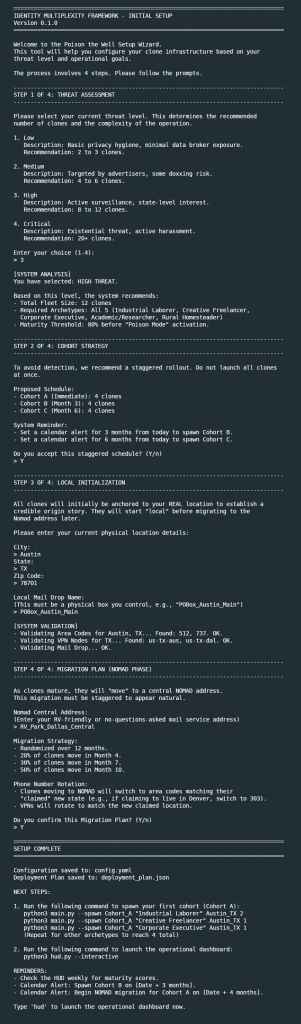
The script is a Python-based command line tool running on your local server. You SSH in, run it, and it becomes your operational hub.
What the Script Handles Automatically Account Initialization and Aging: It creates fresh accounts and immediately begins the warm-up phase, simulating years of passive browsing. |
Geo-Network Routing: It ensures each clone’s traffic exits through the correct VPN node for its assigned city.
Credibility Scoring: It calculates the daily score for each clone based on the four pillars.
Logging: Every action, bot or human, is timestamped and recorded per clone.
What the Script Asks You to Do
The script surfaces tasks that require a human touch through the Today’s Mission screen. Expect these types of prompts:
- Phone calls: “Call this business between 10 AM and noon local time. Here is what to say.”
- Manual posts: “Post this comment on this forum thread. Here is draft text you can edit.”
- Verification confirmations: “Did the magazine arrive at the mail drop? Type Y or N.”
- Infrastructure entries: “Enter the eSIM number for Clone 3.”
- Initialization Gates: “New Clone Candidate: [Archetype] in [City]. Ready to begin aging process? Approve? Y/N.”
The Daily Rhythm
Expect to spend ten to fifteen minutes a day on the system once your first cohort is running.
- SSH into your server. (the Zimaboard in my case)
- Open the script.
- Check Today’s Mission for any pending human tasks.
- Execute the tasks (make a call, post a comment, confirm a delivery).
- Mark them done.
- Optionally review the activity logs if you want to see what the bots did overnight.
- Close the session.
The bots run 24/7 in the background. You only touch the system when it asks you to.
What to Watch For
- Credibility stalls: If a clone sits at 55% for two weeks, the script flags it and suggests specific human actions to break the plateau.
- Temporal violations: If the VPN node drops and traffic routes through a wrong location, the script pauses that clone and alerts you.
- Subscription gaps: If a clone has no activity in a category, the script suggests newsletters or forums to fill the gap.
- Pruning reminders: When a clone transitions life stages, the script prompts you to confirm which interests should be archived.
What It Does Not Do
It does not create fake IDs. It does not commit fraud. It does not impersonate real people. It generates synthetic data attached to your own name and injects it into the public-facing internet where it gets scraped, aggregated, and folded into your profile. The data is false. The identity is yours. Your profile becomes a lie.
Schrodinger’s Identity
The Outcome: You are everywhere and nowhere.
The Broker’s Dilemma: They see a CEO, a Farmer, an Artist, a Worker, and a Professor. All named “Your Real Name”. They cannot merge them because the data is contradictory. They cannot discard them because the data is verified.
The Victory: The cost of untangling your profile exceeds the value of the data. The well is poisoned. Your profile is now the lie.
Getting Started
Installation
Clone the repository and run the setup script.
git clone <repository-url>
cd poison_the_well
chmod +x setup.sh
./setup.sh
Initial Setup
Run the setup wizard to define your threat level and cohort strategy.
python3 main.py --setupSpawn Your First Cohort
Spawn a cohort of clones. For example, five Industrial Laborers in Austin.
python3 main.py --spawn Cohort_A "Industrial Laborer" Austin_TX 5
Launch the HUD
Launch the interactive dashboard to view status, ledgers, and manage interventions.
python3 hud.py --interactiveDocumentation
Full documentation is available in the README.md file included in the repository.

Disclaimer:
This article is for individuals at higher risk or in places that have repressive governments. It is intended to augment freedoms that we all hold dear. I do not advocate anything illegal or immoral be done with this knowledge. Be safe out there.