From Isolation to Active Deception
You already know the drill. You compartmentalize your digital life. Shopping stays separate from banking. Work stays separate from personal. Each identity lives in its own VM, its own browser profile, its own email alias. You’ve done the hard work of building walls between your compartments, and that effort has paid off. This article introduces the next layer of Guerrilla Privacy: Compartment Templates and Digital Clones.
Within each compartment, there is still a single, high-value target. Your real shopping persona. Your real banking persona. Your real work persona. An adversary who successfully links any one of those to you has broken through. The walls between compartments don’t matter if the person inside each one can be identified.
This is where the strategy shifts from defense to offense.
Over the past year, I’ve explored how to flood the data stream with noise. My earlier work on vacation bots showed how to create believable clones that travel the world, connecting to real WiFi networks, pulling live flight data, and generating multi-device telemetry that looks indistinguishable from actual travel. Those bots still run. They still create the geographic fog that makes it hard to pin down where you physically are.
But geographic noise alone isn’t enough. Adversaries don’t just track location. They track activity patterns. They know that you shop in the evenings. They know that you work during business hours. They know that your social media activity peaks on weekends. Even if your locations are obscured, these temporal and categorical signatures create a fingerprint that is surprisingly hard to break.
Instead of manually building each compartment and hoping you got the configuration right, we are going to define a template. That template specifies the OS, the browser, the extensions, the email provider, the password manager, and the behavioral profile. Then, the system spins up not just one persona, but three to five clones for each compartment. Each clone mirrors the activity type but operates from different locations, different time zones, and with randomized behavioral offsets.
More importantly, these clones don’t just run in isolation. They orchestrate across compartments. While you are at work, your shopping clones are browsing and adding items to carts. While you are shopping, your work clones are checking email and reviewing documents. This creates overlapping activity windows that defeat the “complementary schedule” correlation that would otherwise reveal a single human behind multiple identities.
The result is a system where the adversary faces a choice: spend disproportionate resources trying to identify which persona in each cluster is the real one, or abandon the effort entirely because the cost exceeds the value of the data.
This is not a replacement for the work you have already done. It is an automation layer that makes your existing compartments scalable, consistent, and resilient. The questionnaire approach I describe below lets you define your compartments once, and the system generates the configuration files that ensure every instance — real or clone — looks identical to a tracker.
The goal is simple: make the data you leave behind so noisy, so contradictory, and so voluminous that it becomes useless to anyone trying to build a coherent profile of you.
Let’s build that system together.
Designing Your Compartment Template
The biggest failure point in high-threat privacy isn’t a lack of paranoia; it’s operational friction. You know the drill: you spin up a fresh VM (Virtual Machine – VMware), install the browser, configure the extensions, and then—right when you’re deep in the flow — you realize you forgot to mount the specific password manager vault for that compartment. Now you have to shut down, reconfigure, and restart, or worse, you make a shortcut that compromises the isolation.
This is where the Compartment Template changes the game. Instead of manually assembling these environments every time, you define a blueprint once. The system then generates a reproducible, self-contained unit that includes the OS, the browser, the extensions, and crucially, the dedicated password manager vault pre-mounted and ready to go.
The Questionnaire: From Intent to Configuration
To make this accessible without sacrificing precision, we use a guided questionnaire. This isn’t a rigid form; it’s a conversational interface that asks you the strategic questions you already know the answers to, and then translates those answers into a machine-readable configuration file (JSON or YAML).
The questionnaire walks you through seven critical layers. By answering these, you are effectively “coding” your privacy environment without writing a single line of script.
1. Purpose & Behavioral Profile
- What is this compartment for? (e.g., Shopping, Banking, Social, Work)
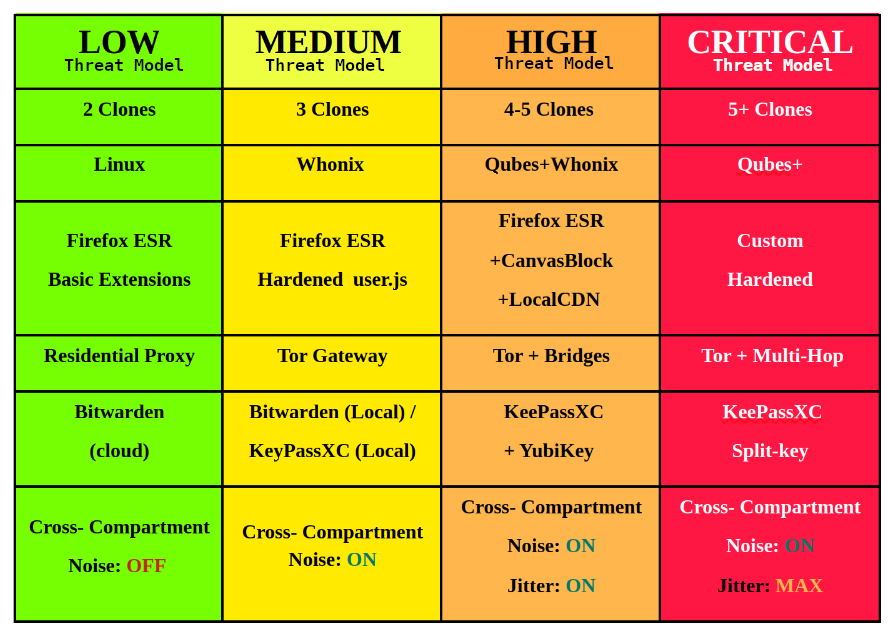
- What is the threat level? (Low, Medium, High, Critical) – This determines how many clones are generated.
- Where does the “Real” persona live? (Geographic region and Timezone)
- Should clones operate in different regions? (Yes/No – Recommended: Yes)
2. The Operating System
- Which OS base image? (e.g., Whonix, Qubes Fedora, Alpine)
- Fixed Screen Resolution? (e.g., 1920×1080, full-screen) – Critical for preventing window-size fingerprinting.
- Locale & Language? (Must match the intended geographic offset of the clones)
3. Browser Environment
- Engine & Version? (e.g., Firefox ESR 115, Brave 1.60)
- Hardening Profile? (Select from pre-vetted
user.jsconfigs) - Canvas Noise? (Enable/Disable)
4. Identity & Communication
- Email Provider? (e.g., Proton, SimpleLogin, Tuta, Mailfence)
- Chat Protocol? (e.g., none, Signal, Session)
- Password Manager Integration?
-
Type: Bitwarden, KeePassXC, or other.
-
Vault File Path: You specify the path to your encrypted vault file (e.g.,
./vaults/shopping.kdbx). -
Mount Point: The system automatically configures the VM to mount this specific file at boot.
Security Note: The manifest only stores the file path, not your passwords. Your actual secrets remain safely encrypted inside the
.kdbxfile – it is just a pointer to the file. The system just ensures the vault is there when you need it. -
5. The Toolkit (Extensions)
- Required Extensions? (Select from a curated list: uBlock Origin, CanvasBlocker, etc.)
- Custom Configs? (Upload specific filter lists or settings files)
6. Social Media (Optional)
- Platforms? (X, Reddit, LinkedIn, etc)
- Profile Template? (Upload a JSON with bio/avatar data)
7. Clone Configuration & Advanced Options
-
How many clones? (Default: 3-5 based on threat level). Enter 0 for a “Burner” compartment with no noise generation (perfect for one-time signups).
-
Cross-Compartment Noise? (Should these clones be active while other compartments are in use? Yes/No).
-
Behavioral Scripts? (Select from pre-defined loops).
Advanced Fine-Tuning: After the basic setup, the generator asks if you want to fine-tune advanced security. If you select “Yes,” you unlock panels for:
-
Browser Fingerprinting: WebGL spoofing, Audio context randomization.
-
Network Fingerprinting: TLS matching, TCP stack tuning.
-
Behavioral Biometrics: Mouse dynamics simulation, Scroll behavior, Stylometry protection.
-
Clone Fidelity: Choose between Standard, Enhanced, or Maximum fidelity (balancing noise quality vs. resource usage).
Generating the Template
Once you submit the questionnaire, the system performs a validation check. It ensures that your timezone matches your locale, that your browser version is compatible with your OS, and that the password manager vault path exists and is encrypted.
If everything checks out, it generates a Compartment Manifest (a JSON file). This manifest is the single source of truth for that compartment. It contains:
- The exact OS image to pull.
- The list of extensions to install with pinned versions.
- The path to the specific password vault to mount.
- The behavioral scripts for the clones.
- The network routing rules (proxy/Tor exit node).
The “Disposable” Lifecycle
The beauty of this system is that the template isn’t just for setup; it’s for tear down too.
When you launch a compartment, the system reads the manifest, spins up a fresh VM, installs the exact software stack, mounts the specific password vault, and loads the behavioral scripts. You log in, do your work, and when you are done, you hit “Destroy.”
The system doesn’t just shut down the VM; it wipes the disk, clears the RAM, and deletes any temporary state. The next time you need that compartment, you spin it up again from the same manifest. It looks exactly the same to the tracker as the last time, but it is a brand-new, clean instance. No drift. No accidental history. No forgotten password vaults.
This eliminates the “human error” variable. You don’t have to remember to mount the vault. You don’t have to remember to install the right extension. The template remembers for you.
By automating the setup and tear down, you free up your mental energy to focus on the strategy: generating the noise. The template ensures the stage is always set perfectly, so you can focus on the performance.
The Compartment Generator
The Compartment Generator is the heart of the system. It is a simple CLI tool that walks you through the questionnaire, validates your choices against your selected base profile, and outputs a ready-to-deploy JSON manifest. No manual JSON editing. No guessing which parameters matter. You answer questions about your life and your threat model, and the generator translates that into infrastructure.
Running the Generator
After unzipping the toolkit, navigate to the project directory and run:
<Terminal – Bash>
./generate_compartment.shThe generator greets you with a summary of the four base profiles and asks you to select one. This pre-fills sensible defaults for every subsequent question. You can accept the default or override it. The generator will warn you if your override falls below the baseline for your selected threat level, but it will not stop you. You are the architect. The tool just keeps you honest.
The Power of Re-usability: Save Your Templates
Setting up a high-security compartment is a chore. You don’t want to re-enter your custom extension list or re-configure your behavioral scripts every time you spin up a new “Business” entity.
The toolkit includes a Template System. Once you have configured a compartment to your satisfaction (e.g.,
Business_Standard), the generator asks: “Save as template?”
How it works:
-
Save: You name it
business_std. The system saves your entire configuration (OS, Browser, Extensions, Scripts, Metadata keys) to a reusable file. -
Reuse: Next time, you run
./generate_compartment.sh.
--template business_std -
Result: The script pre-fills everything. You only change the Compartment Name (e.g.,
Business_2) and the Clone Count.
This turns a 10-minute setup into a 30-second task. Whether you are managing four different businesses or ten research projects, you can spin up a fresh, secure compartment instantly.
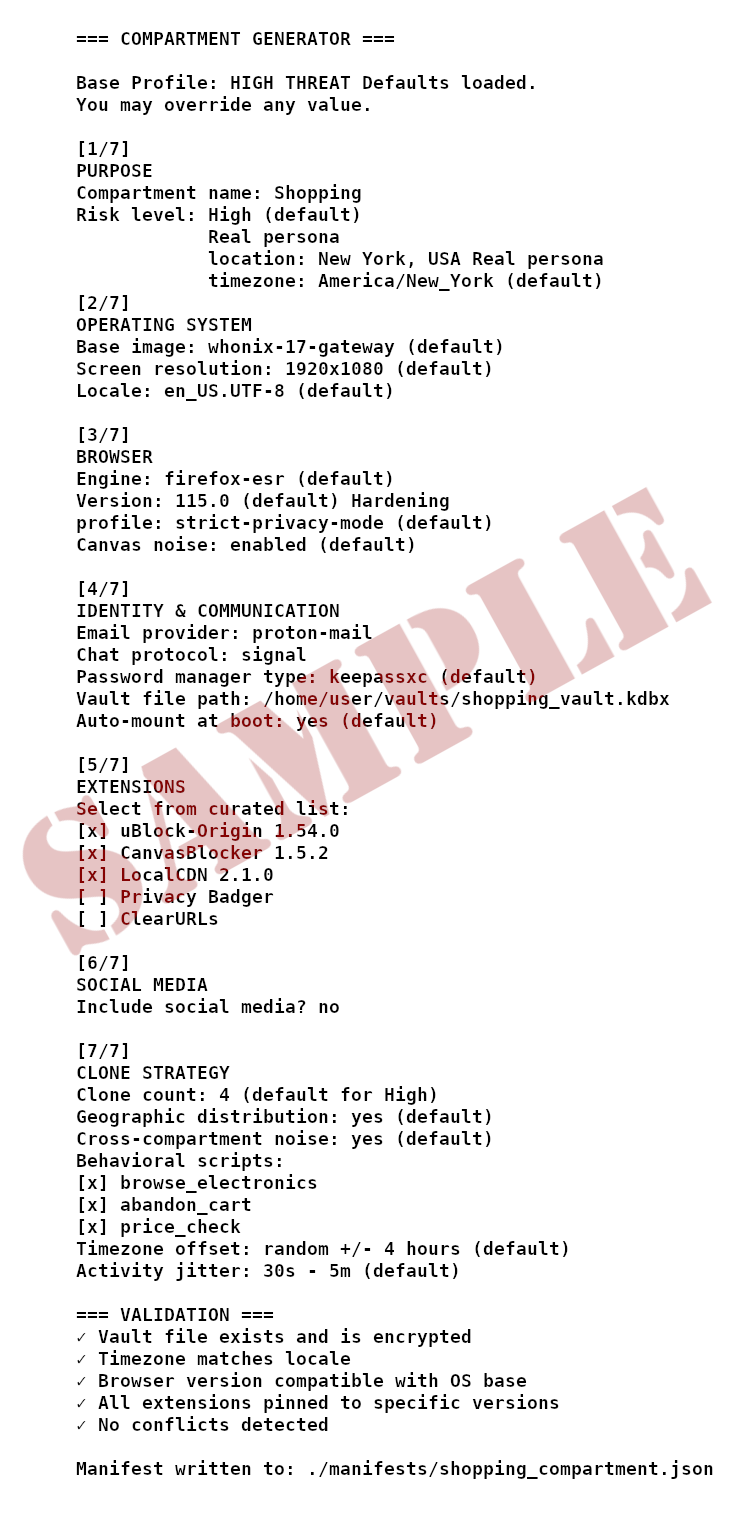
Example: Building a Shopping Compartment
Let’s say you selected the High Threat base profile. The generator begins:
<Terminal – Bash>
That is it. In under two minutes, you have a complete, validated manifest that defines the OS, the browser, the extensions, the password vault mount point, and the clone orchestration rules. The manifest is a plain text file. You can inspect it, version it, and share it.
Deploying the Compartment
With the manifest generated, deployment is a single command:
<Terminal – Bash>
./deploy.sh ./manifests/shopping_compartment.jsonThe deploy script reads the manifest, spins up a fresh VM with the exact specifications, mounts the password vault at /mnt/vault, installs the pinned extensions, and launches the four clones across their assigned time zones. When you are done, you run:
<Terminal – Bash>
./destroy.sh shopping_001The VM is wiped. The disk is cleared. The clones stop. The next time you deploy from the same manifest, you get a pristine, identical environment. No leftover cookies. No accidental history. No forgotten vault.
Full Documentation and Gitea Import
The example above covers the basics, but the full system includes advanced configuration options for clone behavioral tuning, cross-compartment orchestration scheduling, proxy rotation rules, and lifecycle hooks for custom scripts. All of this is documented in detail in the ZIP file.
Grab the ZIP, read the docs, and start building. The code is open, the logic is transparent, and the control is yours.
Conclusion: The Fog of War is Your Friend
We started with a simple truth: compartmentalization is necessary, but insufficient. Isolating your digital life stops data from bleeding between categories, but it leaves the individual compartments vulnerable to identification. A single link, a single behavioral fingerprint, or a single forgotten password vault can collapse the entire structure.
By introducing Compartment Templates and Digital Clones, we have shifted the paradigm from passive isolation to active deception.
We accomplished three critical things in this article:
- We Systematized the Setup: We replaced fragile, manual VM configurations with reproducible, validated templates. The “human error” of forgetting to mount a vault or install an extension is now eliminated by the automation script.
- We Weaponized Noise: We moved beyond simple geographic obfuscation. By deploying 3-5 clones per compartment that operate in different time zones and generate cross-compartment activity, we have created a “fog of war” where the adversary cannot distinguish the real signal from the synthetic noise.
- We Made it Scalable: Through the Questionnaire and the Base Profiles, we turned a complex, high-threshold engineering task into a manageable, repeatable process. Whether you are a casual user or a high-value target, you can now deploy a resilient, self-healing privacy infrastructure in minutes.
Why do this?
Because the data brokers and surveillance apparatus are not standing still. They are refining their correlation attacks, their behavioral profiling, and their AI-driven pattern recognition. Hiding is no longer enough; you must make the data you leave behind unusable.
When an adversary spends hours analyzing your “Shopping” activity only to find four indistinguishable personas shopping in four different cities at four different times, they have not just failed to find you — they have wasted resources. When they try to correlate your work and social lives, they find overlapping activity windows that prove nothing but the existence of multiple distinct users.
You are no longer just hiding in the shadows. You are flooding the zone with light, making it impossible to see the shape of the person standing in the middle.
This is the essence of Guerrilla Privacy. It is not about being invisible; it is about being indistinguishable.
Get the Toolkit
The theory is ready. The code is ready. The templates are waiting.
I have packaged the entire system — the Compartment Generator, the Deployment Scripts, the Base Profile Definitions, and the full Gitea Integration Guide — into a single, downloadable ZIP file.
Download the Guerrilla Privacy Toolkit Here
- Read the Full Documentation: Included in the ZIP (
README.md,DEPLOYMENT.md,GITEA_SETUP.md). - Start Building: Run the generator, spin up your first compartment, and watch the noise begin.
The tools are in your hands. The strategy is yours to execute. Make some noise and hide in it.
 Disclaimer:
This article is for individuals at higher risk or in places that have repressive governments. It is intended to augment freedoms that we all hold dear. I do not advocate anything illegal or immoral be done with this knowledge. Be safe out there.