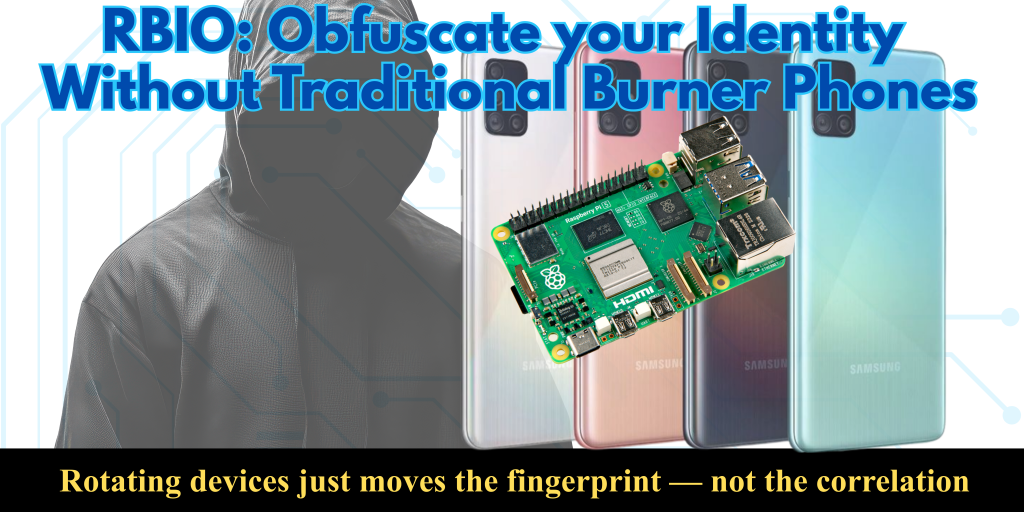
Because rotating devices just moves the fingerprint — not the correlation
For years, I believed the golden rule of digital privacy was simple: buy a new phone, get a new SIM, and start fresh. But as a privacy advocate and Cybersecurity evangelist, I realized this strategy was flawed. Rotating devices doesn’t erase your digital footprint; it just moves the fingerprint. Metadata like cell tower pings, Wi-Fi MAC addresses, and timing patterns still link your devices to your personal life. The hardware itself becomes the weak link.
That realization led me to abandon the traditional burner phone model entirely. Instead of chasing hardware, I decided to chase roles. I developed a concept called RBIO (Role-Based Identity Ownership), a system that treats communication devices not as permanent identities, but as temporary vessels for specific tasks. By decoupling the “who” from the “what,” we can break the correlation chains that surveillance systems rely on.
In this article, I’m going to walk you through how I turned this theory into a working reality using a Raspberry Pi 5 and four affordable Android phones. We aren’t relying on fictional “magic” software or impossible hardware. Instead, we are building a privacy mesh where roles rotate automatically based on entropy — motion, location, and time —rather than a fixed schedule.
This guide strips away the hype and focuses on the doable. You will learn how to:
- Replace the myth of the “paper eSIM” with real, open-source identity management.
- Set up a local provisioning server on your Raspberry Pi to handle role handoffs.
- Choose the right operating systems (like /e/OS or GrapheneOS) for budget-friendly, secure devices.
Whether you are a journalist, an activist, or simply someone who values their privacy, the goal is the same: make your digital presence a moving target. Let’s build a system where no device ever holds the same identity for more than 48 hours, all without ever touching a physical SIM card.
The Core Concept: Roles Over Devices
The fundamental shift in this system is simple but powerful: we stop treating the phone as the identity and start treating the role as the identity. In a traditional setup, if you are a “journalist,” your phone carries that identity forever. If you are a “logistics coordinator,” that phone carries that identity forever. An adversary only needs to track one device to map your entire network.
With Role-Based Identity Ownership (RBIO), the phone is just a generic terminal. It has no permanent identity of its own. Instead, it temporarily “borrows” an identity based on the task at hand. One moment, a specific device is acting as “Field Agent Alpha.” Forty-eight hours later, or after crossing a specific geographic boundary, that same device seamlessly transforms into “Logistics Coordinator Beta.” The hardware remains the same, but the digital fingerprint, the encryption keys, and the network profile are completely different.
How the Workflow Operates
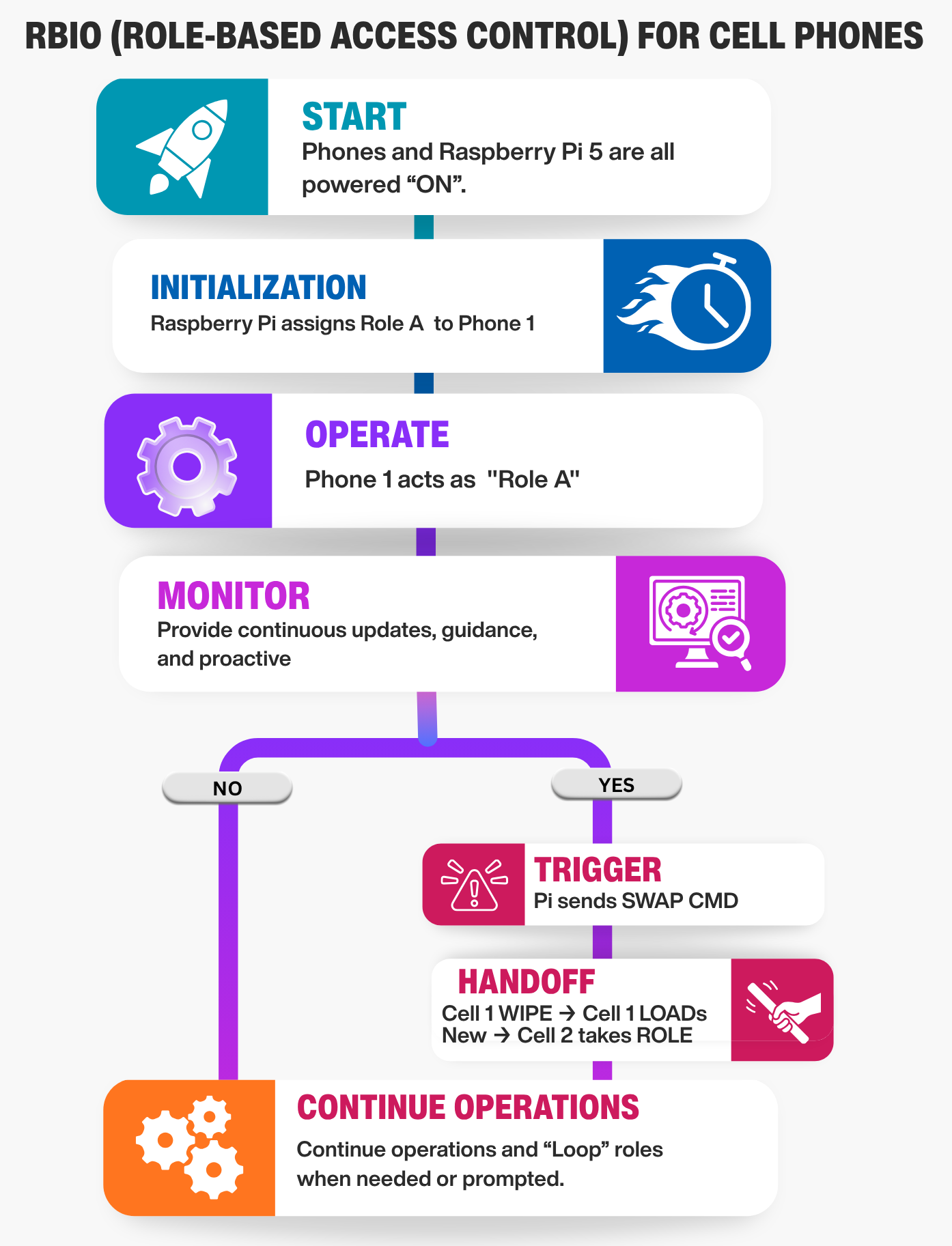
Imagine a mesh of four cheap Android phones and a central Raspberry Pi 5 acting as the brain. The workflow is automated and driven by entropy — randomness derived from real-world movement and time.
- Initialization: You power on the mesh. The Raspberry Pi 5 spins up a local provisioning server. It assigns the first “Role” (e.g., “Outbound Courier”) to Phone A.
- Operation: Phone A connects to the network using the credentials for “Outbound Courier.” It sends and receives data, but to the outside world, it looks like a completely distinct user.
- The Trigger: The system monitors entropy. Did the device move more than 5 kilometers? Has it been online for 48 hours? Did it connect to a new Wi-Fi network? If any of these conditions are met, the “Handoff Trigger” fires.
- The Handoff: The Raspberry Pi instantly revokes the current credentials for Phone A. It generates a new set of encryption keys and a new network profile for a different role (e.g., “Data Relay”).
- Rotation: Phone A downloads the new profile, wipes the old one, and reboots its communication stack. In seconds, it is now “Data Relay.” Meanwhile, Phone B might have just taken over the “Outbound Courier” role.
Breaking the Correlation Chain
This workflow destroys the ability of surveillance systems to build a timeline. Because the roles rotate automatically and unpredictably, there is no continuous thread linking “Agent A” to “Agent B.” Even if an adversary captures the traffic from one device, they cannot link it to the previous task because the cryptographic identity has been severed.
By moving the intelligence to the Raspberry Pi 5, we keep the phones dumb and disposable. The phones don’t need to be expensive or powerful; they just need to be able to receive instructions and switch profiles. The heavy lifting — the logic, the key generation, the entropy calculation — happens on your local, air-gaped Raspberry Pi 5. This makes the system affordable, scalable, and, most importantly, resilient.
Building the Mesh
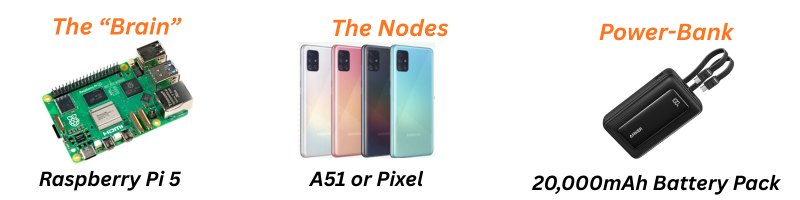
To make this system accessible, we don’t need expensive military-grade gear. The power lies in the software orchestration, not the cost of the devices. Here is the realistic bill of materials to build your RBIO mesh.
The Brain: Raspberry Pi 5 The Raspberry Pi 5 is the ideal choice for the central server. Unlike the older Pi Zero W mentioned in older guides, the Pi 5 has enough processing power to run the provisioning server, the database, and the entropy logic simultaneously without lag.
- Specs: Look for the 4GB or 8GB RAM model. The extra RAM helps if you plan to run multiple services (like a local Jitsi server for voice) alongside the role manager.
- Storage: Use a high-speed MicroSD card (Class 10, A2 rating) or, even better, a USB SSD connected via the USB 3.0 port for faster read/write speeds during role swaps.
- Connectivity: The Pi 5 has Gigabit Ethernet and dual-band Wi-Fi. For maximum security, connect it via Ethernet to your router, keeping the wireless spectrum free for the phones.
The Nodes: Cheap Android Phones The goal is to find devices that can run a privacy-focused operating system like /e/OS or GrapheneOS without breaking the bank. You do not need the latest flagship.
- Best Value Option (/e/OS): Look for used Samsung Galaxy A51, A52, or A53 models. These are widely available on second-hand markets for $80. They have good batteries, decent cameras, and are officially supported by /e/OS, which removes Google tracking and allows for easy identity flashing.
- High Security Option (GrapheneOS): If you can stretch the budget to $150 per unit, look for used Google Pixel 7 or Pixel 8. These are the only devices officially supported by GrapheneOS, offering the highest level of hardware-based security.
- Avoid: Do not buy brand-new phones. Used devices are perfect because they are already “broken” in the eyes of the manufacturer, making them ideal disposable nodes. Ensure the phones have Bluetooth and Wi-Fi enabled, as these are critical for the local mesh connection.
The Connectivity Layer: You do not need physical SIM cards for this system to work effectively.
- Wi-Fi Only Mode: The most secure and cheapest method is to run the phones in Airplane Mode with Wi-Fi enabled. They connect to your local network (or a portable hotspot) to communicate with the Pi. This eliminates cellular metadata entirely.
- eSIM Option: If you need cellular data, use a single eSIM subscription (like Airalo or a local carrier) and rotate the eSIM profile digitally via the Pi. However, for a true “burner” replacement, Wi-Fi-only operation with Session or Matrix is often sufficient and far more private.
Power and Portability: Since this is a mobile mesh, power is key.
- Power Bank: Get a high-capacity 20,000mAh power bank with multiple USB ports. This can keep the Pi 5 and all four phones running for 12+ hours in the field.
- Case: Use a simple, rugged case for the Pi 5 to protect it during transport. The phones can be kept in basic protective sleeves.
Total Estimated Cost:
- Raspberry Pi 5 Kit: ~$100
- 4 x Used Samsung A52 Phones: ~$60 each (~$240)
- Power Bank & Cables: ~$50 (if you don’t already have a drawer full of them)
- Total: ~$390 for a fully functional, automated privacy mesh.
This setup proves that you don’t need thousands of dollars to achieve high-level operational security. You just need the right architecture and affordable, repurposed hardware.
The Software Stack: Orchestrating the Mesh
The hardware is just the body; the software is the brain. To make the RBIO system work, we need a lightweight, automated stack that runs entirely on your local network. This section breaks down exactly what you install on the Raspberry Pi 5 and the Android phones.
1. The Brain: Raspberry Pi 5 Software
The Pi 5 acts as the central command center. We will use Docker to isolate each service, making the system easy to update and secure.
- Operating System: Install Raspberry Pi OS Lite (64-bit). This is a minimal, headless version of Linux with no graphical interface, perfect for screen reader navigation and low resource usage.
- Container Engine: Install Docker and Docker Compose. This allows us to run the provisioning server, database, and logic engine in separate, isolated containers.
- Core Services (The Docker Stack):
- Provisioning Server (Python/Flask): A custom Python script that listens for device connections. It generates unique encryption keys and role configurations on the fly.
- Identity Database (SQLite): A lightweight database that tracks which “Role” is assigned to which “Device ID” and stores the history of swaps.
- Entropy Engine (Python Script): The logic brain. It monitors the heartbeat from the phones and checks for time/motion triggers. When a condition is met, it fires the “Swap Command.”
- Communication Bridge (Optional): If you want voice/video, you can run a local Jitsi Meet or Matrix (Synapse) container. This allows the phones to communicate peer-to-peer without touching the public internet.
Installation Tip: All of this can be managed via a single docker-compose.yml file. You can edit this file using any text editor (like nano or vim) which works perfectly with screen readers.
2. The Nodes: Android Phone Software
The phones need to be “dumb terminals” that can receive instructions and switch identities. The software choice depends on your OS selection.
Option A: GrapheneOS (High Security) Best for: Users who need maximum protection against state-level adversaries.
- Base OS: GrapheneOS (Requires Google Pixel 6a/7/8).
- Communication App: Session or Signal (configured with disappearing messages).
- Why: Session is ideal because it requires no phone number and uses a decentralized network, making it perfect for role-based anonymity.
- Automation Tool: Tasker (with the AutoTools plugin) or Termux.
- Function: A simple script that listens for a specific Wi-Fi packet or MQTT message from the Pi. When received, it triggers a “Wipe Profile” command, restarts the communication app, and loads the new identity keys.
- Network Mode: Wi-Fi Only (Airplane Mode ON) to eliminate cellular metadata.
Option B: /e/OS (Budget Friendly) Best for: Users who need affordability and wide device compatibility (Samsung, Xiaomi, etc.).
- Base OS: /e/OS (Murena Foundation).
- Why: It strips out all Google services and replaces them with open-source alternatives, providing a clean slate for role rotation.
- Communication App: Element (Matrix client) or Session.
- Function: These apps support “accounts” that can be switched easily. The automation script will log out of one account and log into the new one.
- Automation Tool: MacroDroid (User-friendly, no coding) or Termux.
- Function: Similar to Graphene, this listens for the “Swap” signal from the Pi. MacroDroid is particularly accessible as it uses a visual block-based interface that can be navigated with TalkBack.
- Network Mode: Wi-Fi Only or eSIM (if cellular data is strictly required).
3. The Connection Protocol
How do the phones talk to the Pi?
- MQTT (Message Queuing Telemetry Transport): This is the standard protocol for IoT devices. It is lightweight, fast, and perfect for sending “Swap” commands.
- Setup: The Pi runs an Mosquitto broker (an MQTT server).
- Flow: The phones subscribe to a topic like
rbio/commands. When the Pi wants to swap a role, it publishes a message to that topic. The phone receives it instantly and executes the script.
- Security: All communication is encrypted via TLS (Transport Layer Security). The Pi and phones exchange certificates during the initial setup, ensuring that no outsider can inject a fake “swap” command.
Summary of the Stack
|
Component |
Graphene Path |
/e/OS Path |
Pi 5 Path |
|---|---|---|---|
|
OS |
GrapheneOS |
/e/OS |
Raspberry Pi OS Lite |
|
Comms App |
Session / Signal |
Element / Session |
Docker Containers |
|
Automation |
Termux / Tasker |
MacroDroid / Termux |
Python Scripts |
|
Protocol |
MQTT over TLS |
MQTT over TLS |
Mosquitto Broker |
|
Cost |
Higher (Pixel hardware) |
Lower (Used Samsung/Xiaomi) |
Low (~$100) |
This stack gives you a fully functional, automated privacy mesh. The Pi 5 handles the heavy logic, while the phones remain simple, disposable nodes that can be wiped and reloaded in seconds.
The Ready-to-Run Package
Building a Role-Based Identity Ownership (RBIO) mesh involves coordinating multiple layers: a Python provisioning server, an MQTT broker for real-time commands, a SQLite database for role tracking, and specific automation scripts for both GrapheneOS and /e/OS devices. Doing this manually requires navigating complex terminal commands, configuring Docker containers, and writing custom scripts for every phone model.
To make this accessible for everyone—from the privacy novice to the seasoned sysadmin—we have consolidated the entire stack into a single, ready-to-deploy package.
What’s Inside the Package? Instead of piecing together fragments from various forums, you will receive a comprehensive ZIP file containing:
- The Docker Compose File: A single configuration file that spins up the Provisioning Server, MQTT Broker, and Database on your Raspberry Pi 5 with one command.
- The Entropy Engine: Pre-written Python scripts that handle the logic for time-based and motion-based role swaps.
- Phone Automation Scripts: Two distinct folders containing the exact scripts needed for GrapheneOS (using Termux) and /e/OS (using MacroDroid or Termux). These scripts listen for the “Swap” command and execute the identity wipe-and-reload sequence automatically.
- Configuration Templates: Ready-to-edit JSON files for defining your roles (e.g., “Courier,” “Relay,” “Observer”) and setting your specific entropy thresholds (time limits, distance triggers).
- Setup Guide: A plain-text, screen-reader-friendly walk through for installing the package on your Pi and flashing your first phone.
Why a Local Git Server? We know that many privacy advocates prefer to host their own code repositories to avoid reliance on centralized platforms like GitHub or Google. That is why this package is designed to be self-contained.
- You can unzip the folder directly onto your Raspberry Pi.
- Alternatively, you can host this ZIP file on your own Gitea or GitLab instance.
- The installation process is designed to work offline once the initial files are transferred, ensuring your mesh remains isolated from the public internet.
Getting the Package: At the end of this article, you will find a link to download the RBIO-Mesh-Kit.zip. This file contains everything you need to turn your Raspberry Pi 5 and four cheap Android phones into a fully automated, role-rotating privacy network. No coding skills required—just unzip, configure your roles, and deploy.
Conclusion: Reclaiming Your Digital Sovereignty
The era of the disposable burner phone is ending. As surveillance techniques evolve, simply swapping SIM cards or buying new hardware is no longer enough to break the correlation chains that track our movements and identities. The future of privacy lies in dynamic identity — a system where the device is merely a vessel, and the role is the only thing that matters.
By implementing Role-Based Identity Ownership (RBIO) on a Raspberry Pi 5, you are not just building a network; you are building a fortress of ambiguity. You are creating a system where no single device holds a permanent identity, where roles rotate automatically based on real-world entropy, and where the logic of your security remains entirely in your hands.
This approach democratizes operational security. You don’t need a million-dollar budget or a team of engineers. You need a few affordable phones, a powerful Pi, and the right software stack. You need the courage to move beyond the old ways and embrace a mesh that adapts, evolves, and protects you in real-time.
Take Control: Download the RBIO-Mesh-Kit
Theory is powerful, but action is transformative. We have done the heavy lifting for you. The entire software stack—including the Docker configurations, the Python entropy engines, and the automation scripts for both GrapheneOS and /e/OS—is ready for you to deploy.
This package includes:
- One-Click Docker Setup for your Raspberry Pi 5.
- Pre-configured Automation Scripts for your Android phones.
- Self-Hosting Instructions to run this entirely on your own Gitea or local server.
Host It Yourself Remember, true privacy means owning your tools. Once you download the ZIP, we encourage you to host it on your own Gitea instance or store it on an encrypted drive. Do not rely on third-party servers for your operational security.
Join the Movement
Privacy is not a product; it is a practice. By adopting the RBIO mesh, you are joining a growing community of advocates who refuse to be tracked, correlated, or predicted. Whether you are a journalist, an activist, or simply a citizen demanding the right to disappear, this system gives you the tools to reclaim your digital life.
Build your mesh. Rotate your roles. Stay ahead of the curve.

Disclaimer:
This article is for individuals at higher risk or in places that have repressive governments. It is intended to augment freedoms that we all hold dear. I do not advocate anything illegal or immoral be done with this knowledge. Be safe out there.